Software built around the way education actually works.
Four distinct products. One company focused on solving real educational problems. GIMS helps institutes manage everyday operations. Grawity Classroom supports teaching, practice and assessment. Grawity Events helps organizers manage registrations, tickets and campus entry. Aivex is a browser-based IDE with AI, for writing and running code with nothing to install.
GIMS
Grawity Institute Management System. Admissions, fees, attendance and results stop living in registers and spreadsheets, and everyone in the institute works from the same record.
- The owner sees the whole institute: every batch, every rupee pending, every teacher.
- The front desk logs enquiries and turns them into admissions.
- Teachers work with their own batches, attendance and tests.
- Students see their profile, fees, attendance and test results in their own portal.
Enquiries & admissions
A pipeline from new to converted, with every follow-up on record. One step turns an enquiry into a student, their batch and their fee plan, and emails the admission form as a PDF.
Courses & batches
One-time or monthly courses, batches with seat limits that hold, mixed batches where each student follows their own course, and transfers that keep the history.
Fees & receipts
Full or part payments by cash, UPI, card, bank transfer or cheque, a numbered PDF receipt in your name, automatic reminder emails and a WhatsApp reminder in one tap.
Attendance
Today's classes on one board, present, absent or late in a minute, and an email to students marked absent the same day. Teachers can take it from Classroom too.
Tests & results
Timed multiple-choice tests with shuffled papers, assigned to a course, a batch or chosen students, and graded the moment they're submitted.
Teachers & control
A login for each teacher, admissions direct or sent to you for approval, an optional share of the fees from their batches, and recent activity on the dashboard showing who did what.
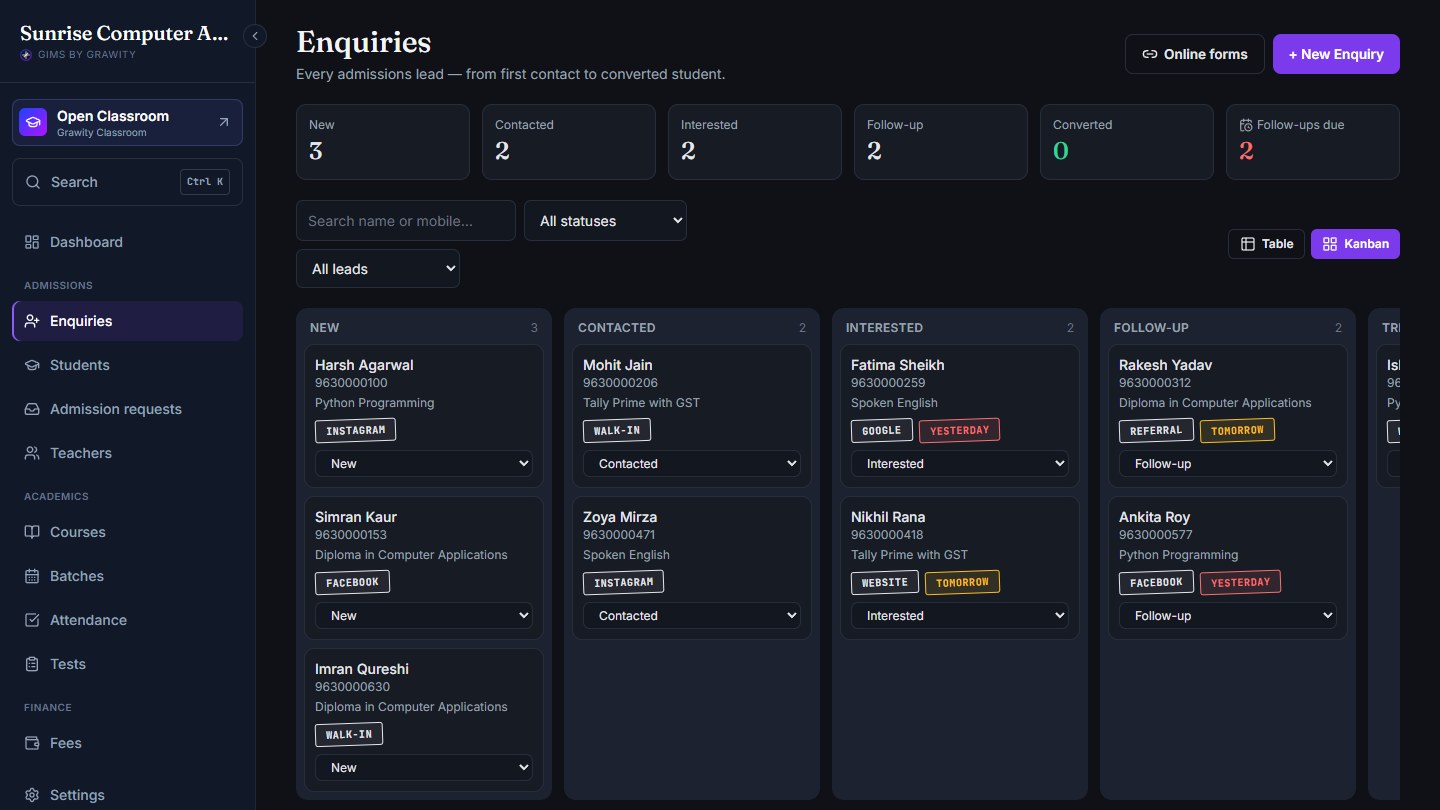
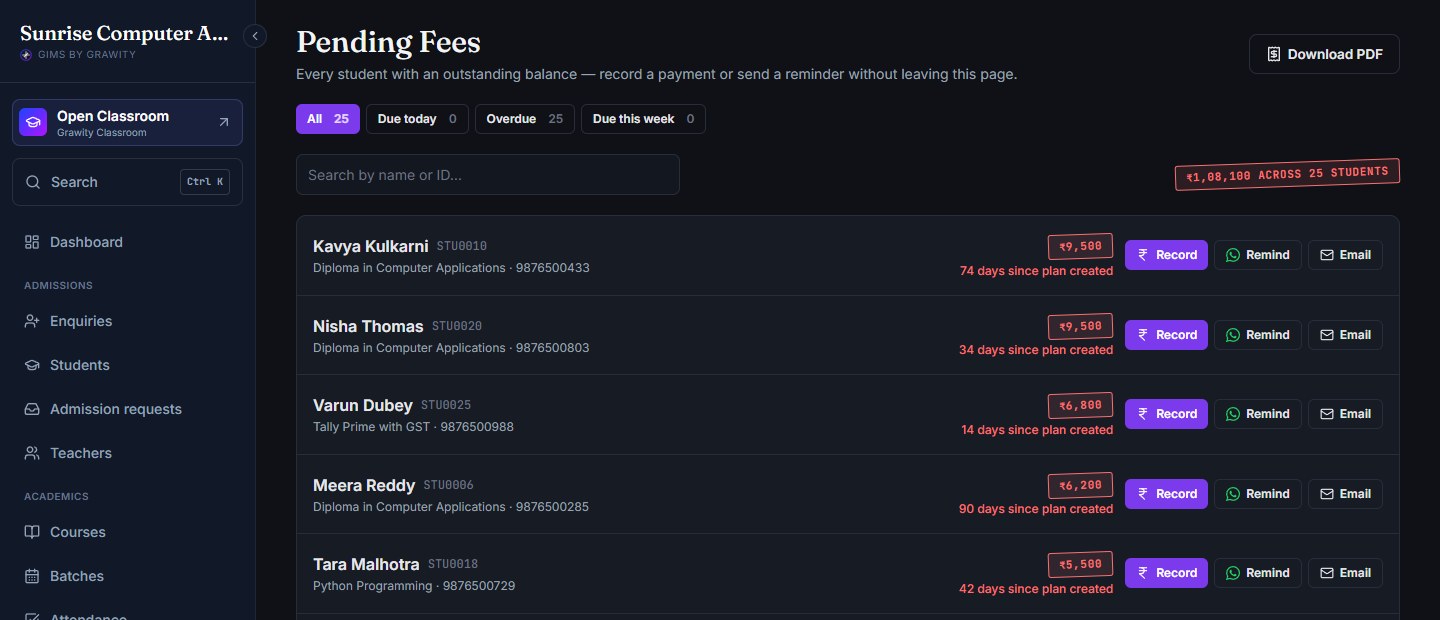
Real screens from the product. The institute and the people in them are made up.
Full GIMS feature tour on gims.grawity.in →Grawity Classroom
A complete learning workflow. Teachers build the course once; students learn, practise, hand in work and are assessed in the same place, and progress is visible to everyone who needs it.
- Create: courses, lessons, notes and files, or a whole curriculum imported from one file.
- Practise: questions on every lesson and a revision list that brings back what is slipping.
- Assess: tests from a question bank and assignments with rubrics.
- Improve: skills per topic show exactly what to reteach.
Lessons & resources
Notes with headings, tables, tips and code that read well on a phone, plus files and links. Students ask questions under the lesson, and teachers tick off each class day as it is taught.
Question bank & tests
Questions tagged by topic and difficulty, reused across tests. Random draws, shuffled options and per-student number variations mean no two papers match.
Practical assignments
Work students build in a browser workspace, with starter files and automated checks, handed in, returned with feedback and improved, with every version kept.
Grading & gradebook
Rubrics set once and applied to everyone, bulk grading, optional peer review, and a gradebook you can download as Excel or PDF.
AI that assists
AI drafts questions and suggests marks with a reason; nothing is used until a teacher approves it. Students get a tutor on the lesson, in English, Hindi or Hinglish.
Progress & certificates
Skills per topic, students at risk on the teacher's dashboard, and certificates in your own design with a public link that verifies them.
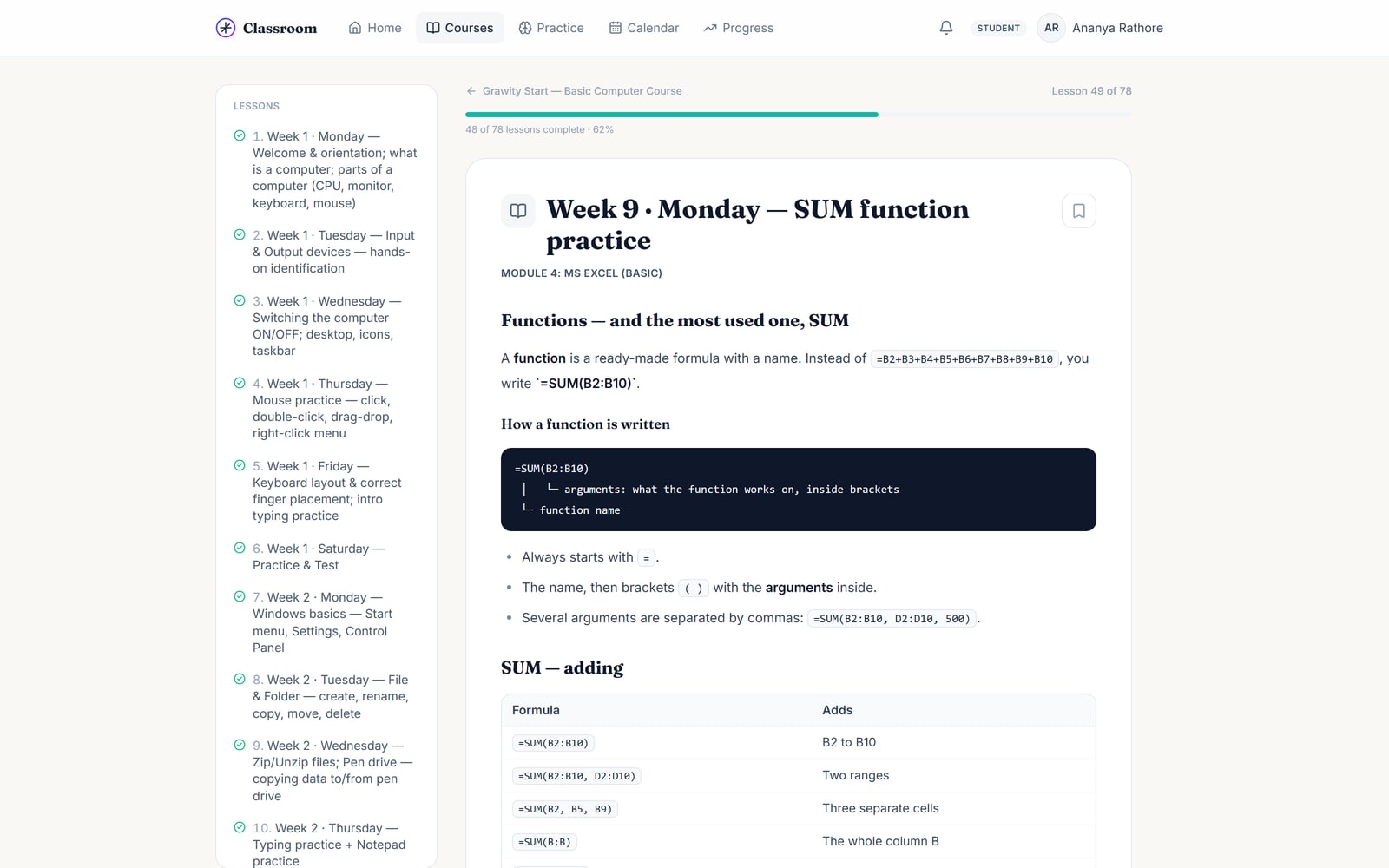
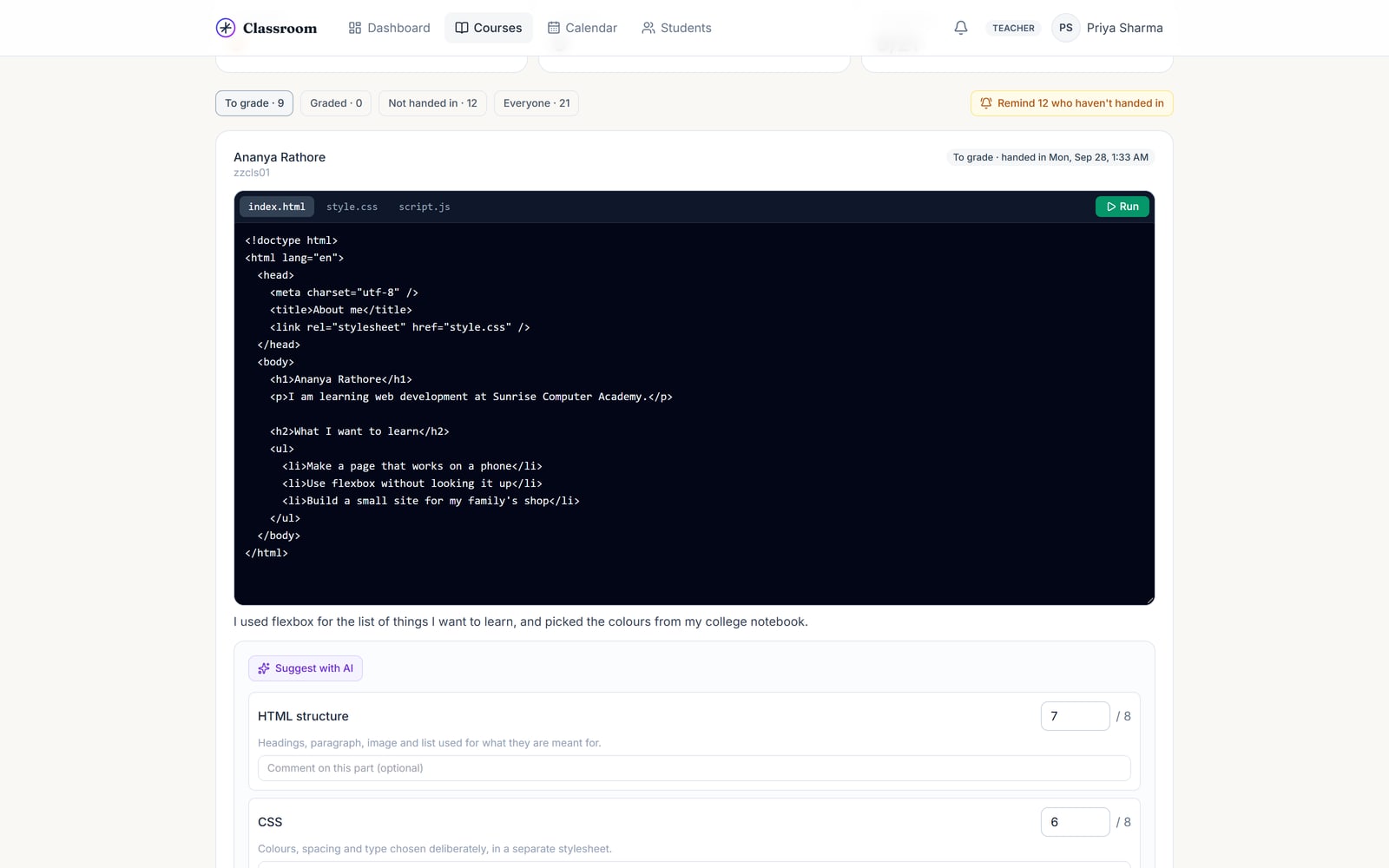
Real screens from the product. The institute and the people in them are made up.
Full Classroom feature list on classroom.grawity.in →Grawity Events
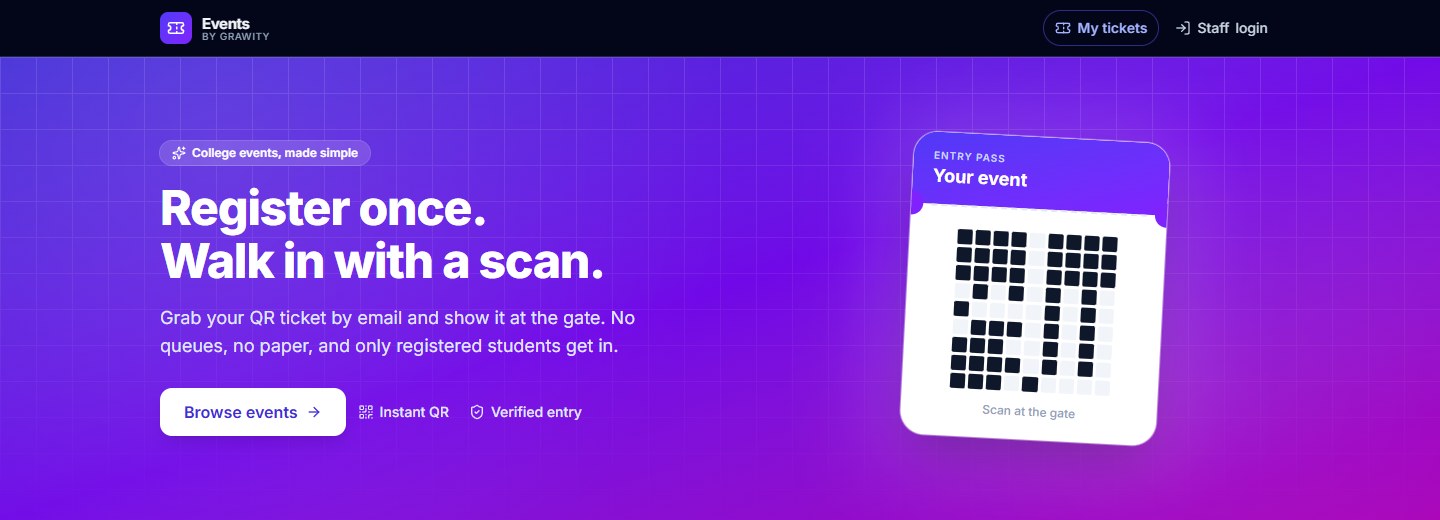
Registration, tickets and entry for college events: freshers, farewells, fests. Students register from a link and walk in with one scan; organisers see who registered, who paid and who came.
- Students register in a minute and get a QR ticket on screen and by email.
- Volunteers at the gate scan it with their phone: green to enter, payment due, or already entered.
- Organisers approve registrations, take refunds and download the attendee list.
- The admin sees registered, entered, and cash against online collected.
Registration & QR tickets
A registration link per event, and a QR ticket shown on screen and emailed. Many events run from one setup.
Keeping outsiders out
Per event, allow only the roll numbers you upload, approve each registration, or open it to anyone with the link.
Tickets by type and batch
Student, volunteer or guest tickets at their own price, each limited to the batches and kinds of student you choose. The server enforces it, not the form.
Cash or online
Pay in cash at the gate, or online through Razorpay by UPI, card or netbanking. A ticket is marked paid only when Razorpay confirms it, and refunds are tracked.
Gate scanner
Runs in a phone's browser. Green means enter; "payment due" means collect cash and let them in; "already entered" means no. Forgot the QR? Look them up by roll number.
Staff, privacy & reports
Admin, organiser, volunteer and scanner roles; volunteers never see emails, phone numbers or the attendee list. Totals by batch, ticket and volunteer, with CSV export.
Aivex
A browser-based IDE with AI. Write, run, preview and share code from any device, with nothing to install, so a student can practise on a lab computer, a laptop or a phone and pick up where they left off.
- Students learning web development, Node.js, C, C++, Java or Python, without setting anything up.
- Teachers and labs that want every student coding in minutes, on whatever machine is in front of them.
- Teams building a project together, in the same files, with a chat beside the code.
AI assistant, @Vex
Ask @Vex to build features, fix bugs or explain code. It sees your open file and selection, saves its changes and remembers your project.
Web with live preview
HTML, CSS and JavaScript sites open in a fraction of a second and update as you type, with console output right in the editor.
Node.js in the browser
Run Express servers and full-stack apps without installing anything, with a live preview you can open in a new tab.
C, C++, Java, Python
C compiles and runs in the browser in milliseconds, with interactive scanf input. C++, Java, Python and more run on the cloud runner.
Build together
Invite teammates, chat in the project, see who is typing and work on the same files in real time.
A real project workspace
Folders, multiple files, tabs, quick open (Ctrl+P) and one-click ZIP download of the whole project.
GIMS and Classroom, working as one.
They are separate products on purpose, so an institute can start with either one. What makes them work as one is a single Grawity identity: the same student, teacher and institute across both.
- Admit once. A student admitted in GIMS gets Classroom access automatically, on the course they were assigned.
- Sign in once. The same email and password, and an "Open Classroom" button inside GIMS.
- One register. Attendance taken in either product is the same attendance.
- Batch teachers see their batch. In Classroom, a teacher sees the students of the batches they teach in GIMS.
- Admit from Classroom. Teachers can send an admission from Classroom; it lands in GIMS, with your approval if you want it.
Grawity Events is separate: it has its own accounts and doesn't need GIMS or Classroom, so a college can run its events on it whatever else it uses. Aivex is separate in the same way, with its own accounts, for anyone learning or building code.
GRAWITY  — education technology
│
├── GIMS
│   └── institute management
│       enquiries · admissions · fees
│       attendance · tests · reports
│
├── Grawity Classroom
│   └── teaching & learning
│       lessons · practice · tests
│       assignments · grading · certificates
│
├── Grawity Events   (stands alone)
│   └── college events
│       registration · QR tickets · gate
│
└── Aivex            (stands alone)
    └── browser IDE with AI
        web · Node.js · C · Python
        AI assistant · collaboration
What institutes usually ask first.
Do we need both GIMS and Classroom?
No. GIMS and Grawity Classroom work on their own, so you can start with either. If you use both, they share the same students, teachers and courses automatically.
What is Grawity Events for?
College events such as freshers, farewells and fests: students register from a link, get a QR ticket by email, pay online or in cash, and are scanned in at the gate on a phone. It works on its own and doesn't need GIMS or Classroom.
What is Aivex?
A browser-based IDE with AI at aivex.in. Students and developers write and run HTML, JavaScript, Node.js, C, C++, Java and Python from any device without installing anything, build with an AI assistant, and collaborate in real time. It has its own accounts and doesn't need GIMS or Classroom.
Do students need a second account for Classroom?
No. A student admitted in GIMS gets their Classroom account and course automatically, and signs in with the same email and password.
Can we start with one batch?
Yes. Many institutes run one batch for a few weeks before moving the rest. Nothing forces a switch all at once.
Does it work on a phone?
Yes. Both products work in a phone's browser and can be installed on the home screen like an app. Teachers can mark attendance and grade from their phone.
Who owns our data?
Your institute does. Each institute's records are kept separate from every other institute's, and the owner can download a full backup from GIMS at any time. More on Trust & data.
Is it available in Hindi?
The screens are in English. The AI tutor in Classroom answers in English, Hindi or Hinglish, whichever the student writes in, and the ready-written WhatsApp fee reminder can be edited into any language before you send it.
How much does it cost?
Write or WhatsApp us with how many students you have and which product you want, and we will send you the price.
Want this for your institute?
Tell us how your institute runs today, or which event is coming up, and we'll show you what Grawity would change.